Last Friday, Chen Jin who is Lenovo China’s General Manager mobile phone business department shared a retail package of an unknown Motorola phone through Weibo. The Weibo post suggests that a couple of Motorola phones could be landing soon in China.
Lenovo sold only two Motorola phones such as Moto G7 Plus and Motorola P50 in China last year. However, the home market was treated with several Lenovo phones. This year, except for selling the Motorola Razr (2019) and Razr 5G phones, it did not launch any other Motorola branded phones in the home market. Also, very few Lenovo phones including the Lenovo Legion Pro were released in China.
In an interview last month, Jin said that the company adopted a new strategy for selling Lenovo and Motorola branded phones in China. Lenovo’s Lemon-named phones will be used to sell low budget phones. The company has already launched a couple of Lemon K12 series smartphones in China earlier this month.
The Legion brand will have performance-driven phones like the Legion Pro (aka Legion Duel in global markets). As far as Motorola branding is concerned, it will include mid-to-high smartphones. Hence, the teaser shared by Jin suggests that the company could be gearing up to launch a new mid-range or a high-end Motorola smartphone in China. Probably, the mysterious phone may go official as early as next month.
Motorola has launched a couple of 5G-ready phones such as Moto G 5G, Moto G 5G Plus, and so on in global markets recently. Probably, some of these phones could be landing in China soon. Motorola is expected to announce a Snapdragon 800-series Moto G phone soon. Also, it plans to launch a flagship phone powered by the Snapdragon 888 in 2021. The final product names of these high-end phones are under wraps.
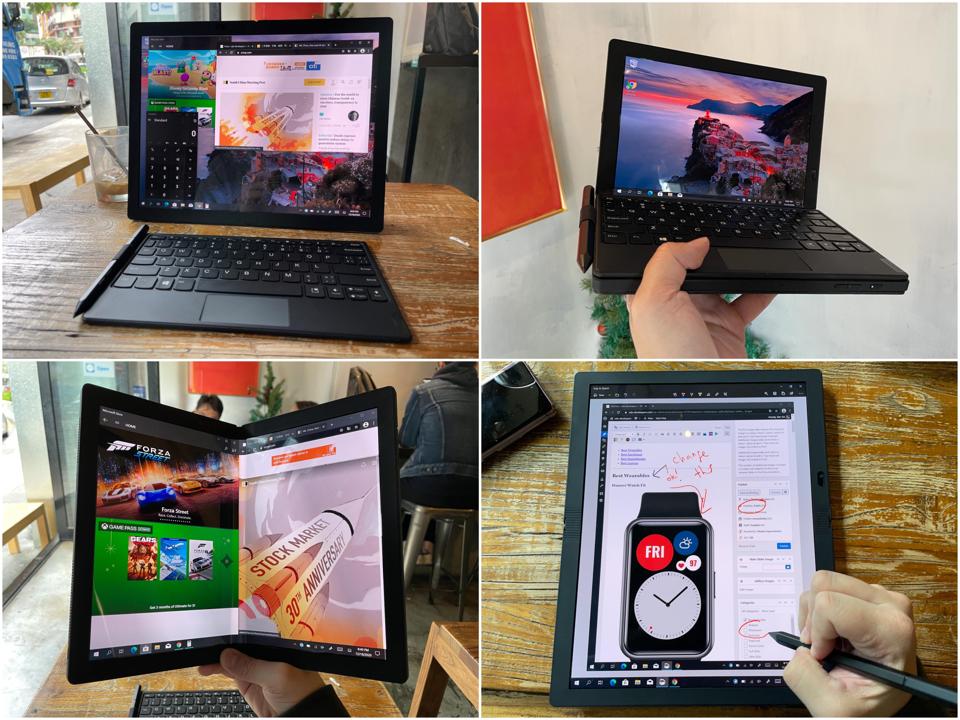
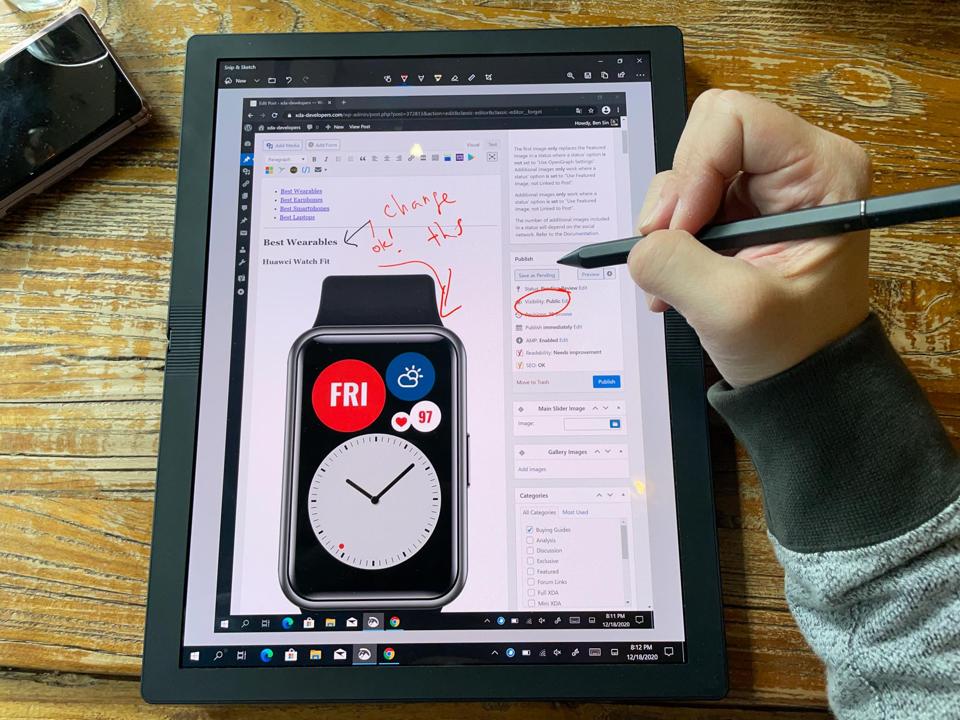
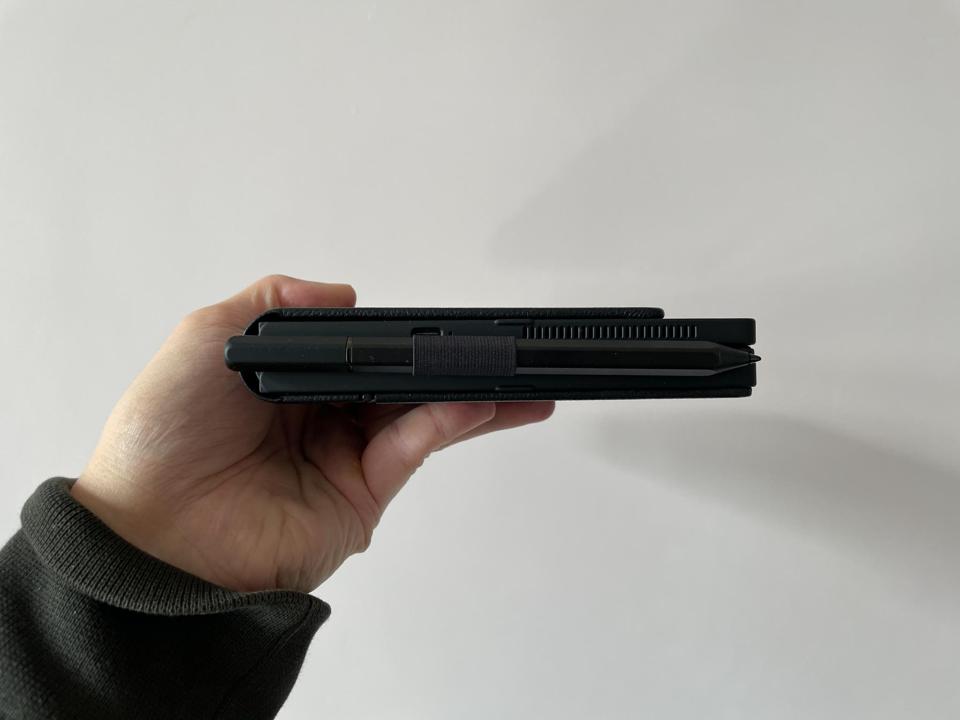
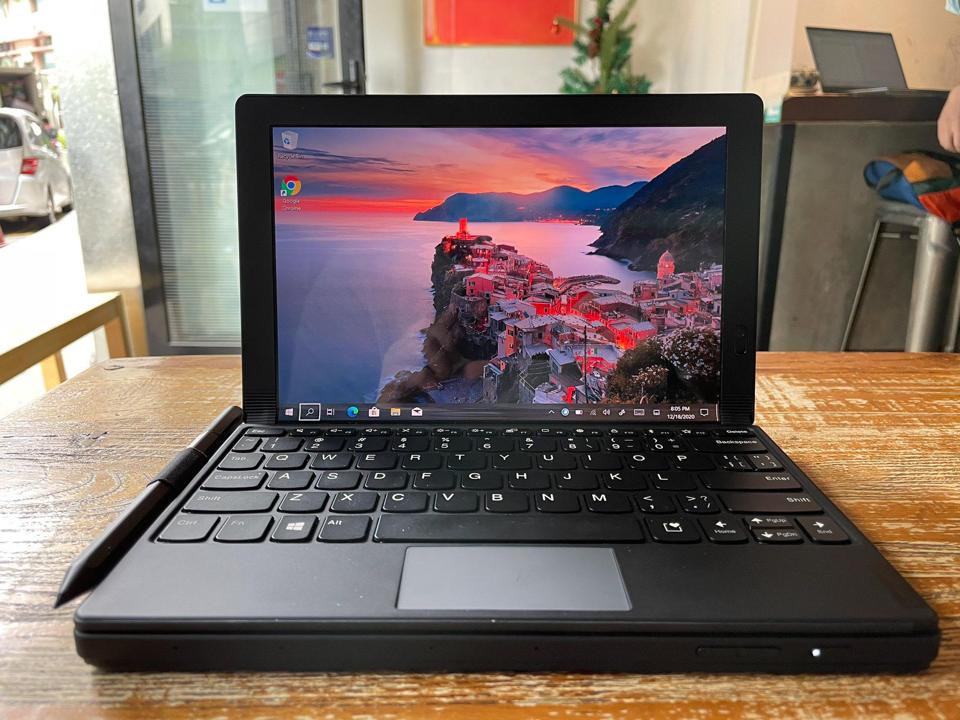
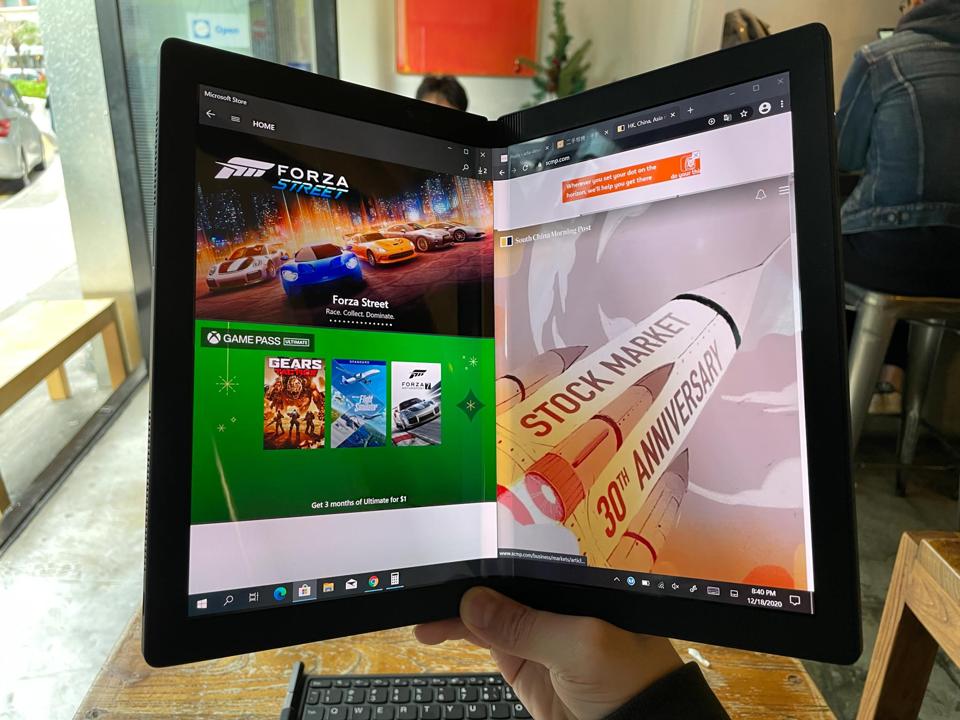
The photo collage above shows a relatively large monitor, a small ultrabook-style laptop, a dual-screen reading device shaped like a book, and a tablet with stylus support. They are all one device: the Lenovo ThinkPad X1 Fold, a bleeding-edge, first-of-its-kind “foldable PC.”
That ability to transform hinges on the flexible OLED display panel, which can bend and fold, and a cleverly designed mini keyboard that attaches to half the device.
The tablet, keyboard, plus the stylus—which Lenovo calls “Mod Pen” costs an eye-watering HK$24,799 ($3,200). This price is particularly shocking considering the internals are solid-but-not-top-tier: an Intel Lakefield core i5 processor with an integrated GPU and 8GB of RAM. But still, most of the cost is going to the cutting-edge technology and design—a price to pay for early adopters eager to get a glimpse at the future of personal computing.
And after using this thing for nearly a week, I think it is indeed the future. I absolutely adore the versatility of the X1 Fold, which is especially useful in an always-busy, densely populated city like Hong Kong.
Design: versatile and durable
The Lenovo ThinkPad X1 Fold is at its core form a large tablet. The 13.3-inch screen features an unusual 4:3 aspect ratio (most tablets use a more rectangular 16:9), which means this 13.3-inch actually provides much more screen real estate than a 13-inch Dell laptop.
The largeness of the tablet is compounded by the fact the bezels around the screen are large by 2020 standards, and the device itself is thick at almost exactly half an inch when unfolded. The 2.2 pound weight is also heavy by tablet standards (but not so if judged as a laptop).
MORE FOR YOU
The Lenovo ThinkPad X1 Fold.
ben Sin
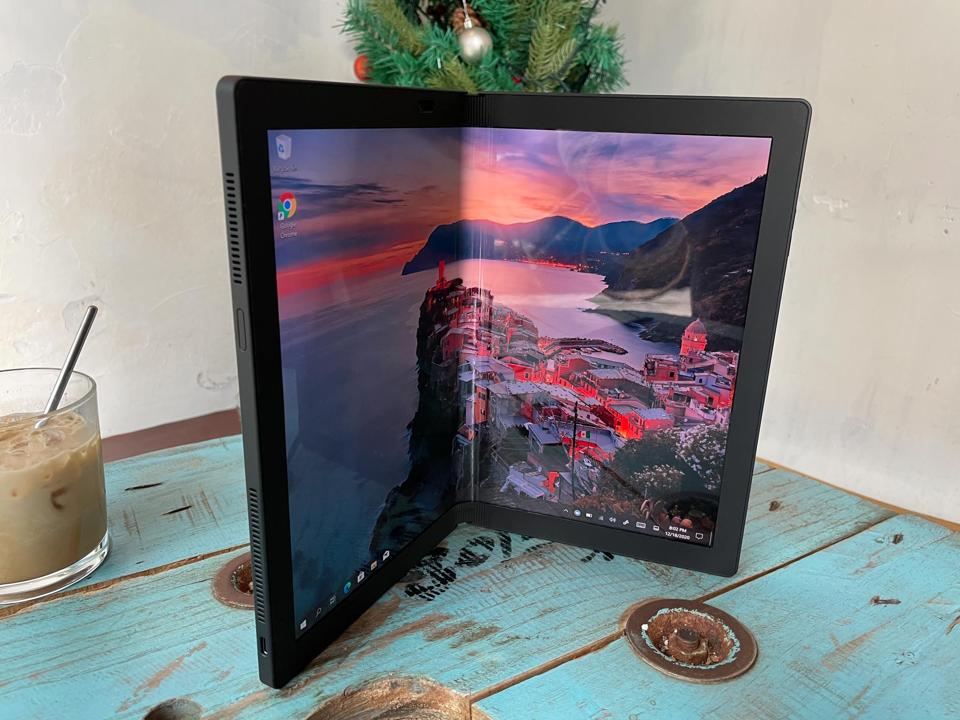
Lenovo ThinkPad X1 Fold half folded.
Ben Sin
Using the tablet is just fine, because the device runs Microsoft’ Windows 10 Pro, which is still first and foremost a computer software. I’ll elaborate more later.
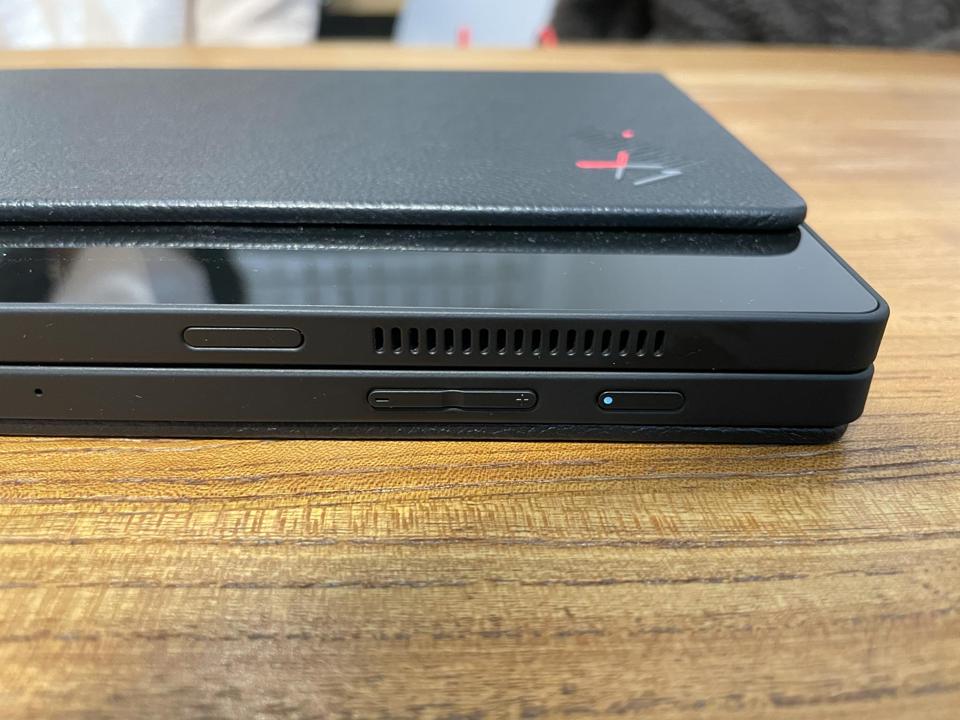
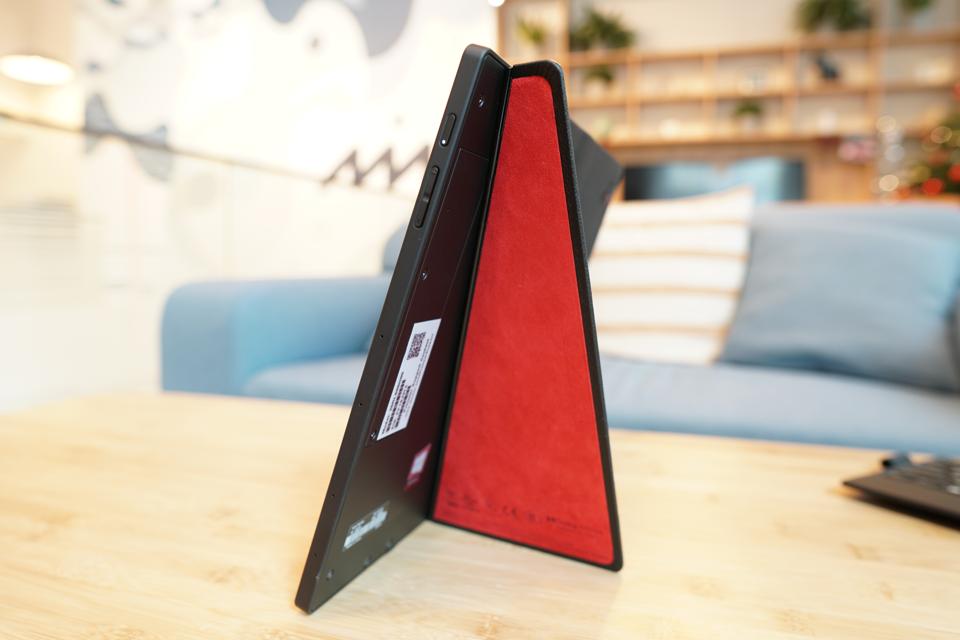
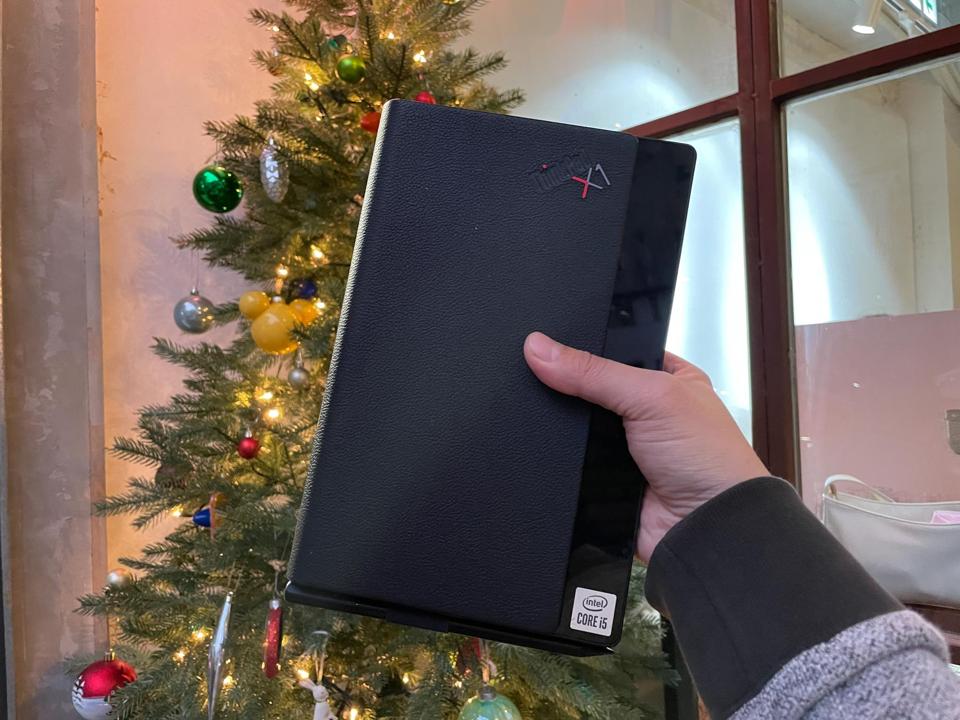
When folded close, the X1 Fold measures 9.3 x 6.23 x 1.09 inches—roughly the dimensions of a hardcover book—albeit a thick one. The back of the tablet is covered in premium leather, which gives the closed machine the vibe of a Moleskin notebook. A corner of the leather cover can be pulled out to work as a kickstand, which props the device up on its own.
The tablet has a non-removable leather back cover.
Ben Sin
The kickstand flap
Ben SIn
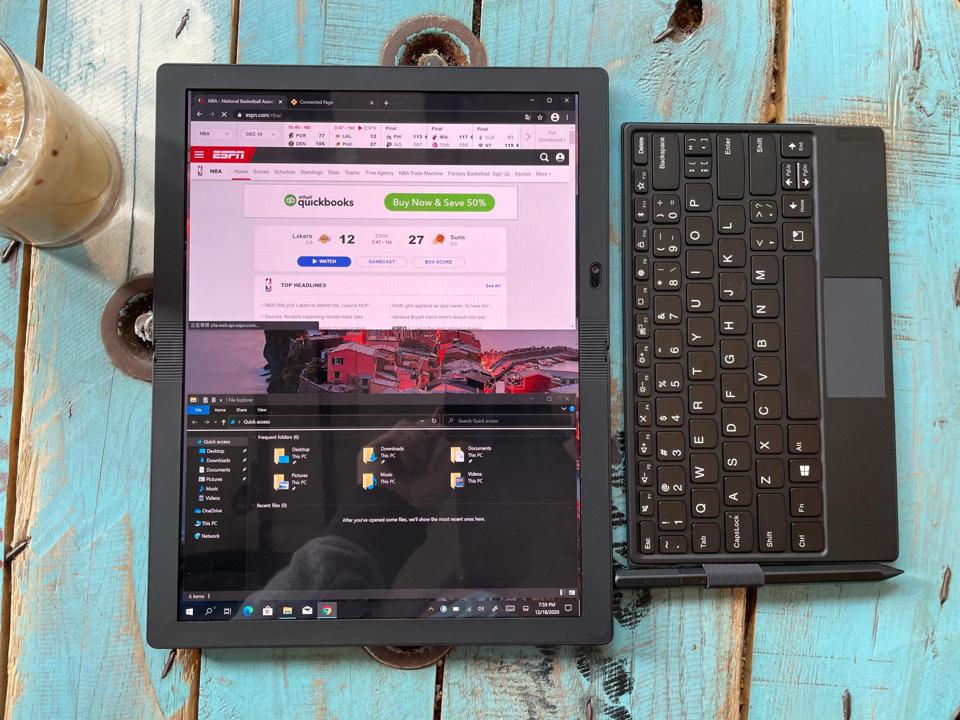
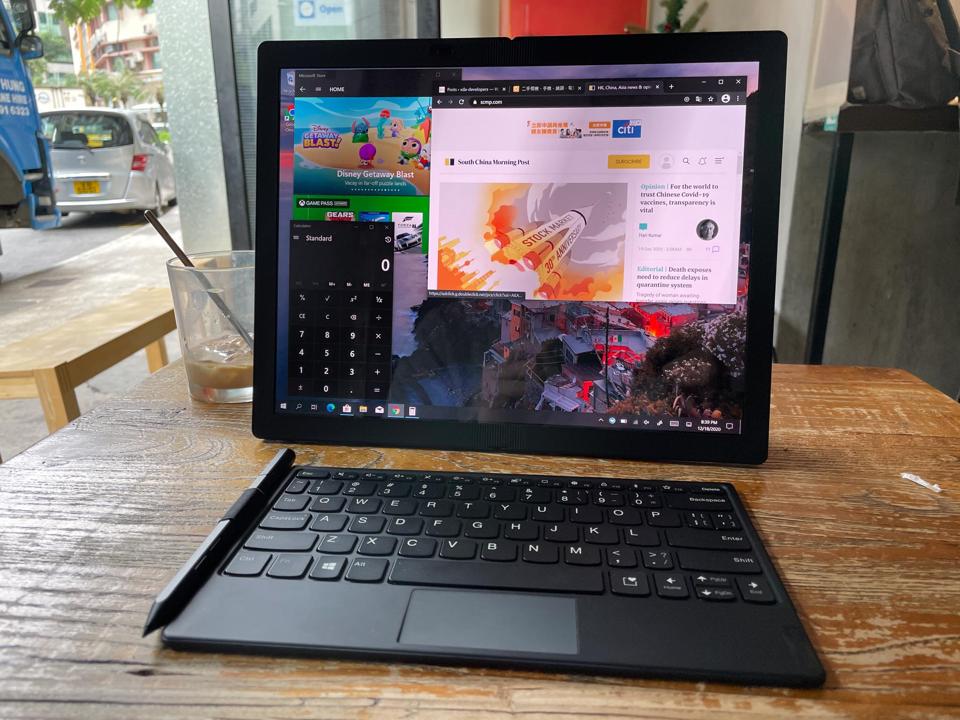
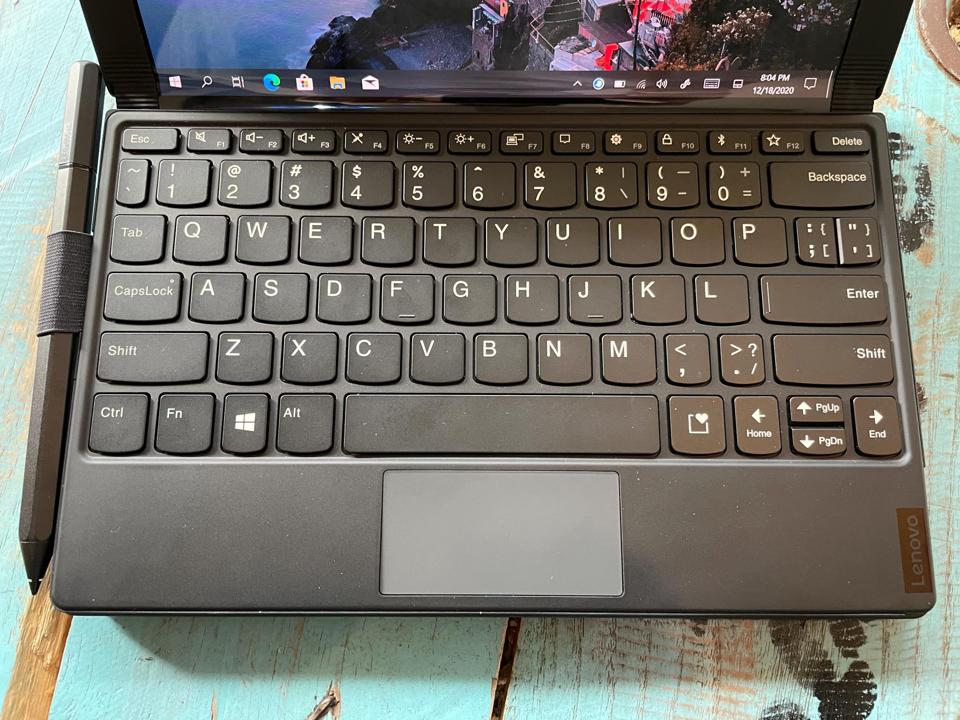
Once the X1 Fold is propped on a desk, you can pair it with any bluetooth keyboard and use it like an all-in-one desktop device. As mentioned, Lenovo designed an ultra thin keyboard to go with this machine. The keyboard is impossibly thin—thinner than a coin—but still offers solid key travel. The keys are a bit cramped, but overall I can still type on this without any issues. As mentioned, the unusual screen aspect ratio makes this screen feel roomier than usual. In fact, the X1 Fold in this form offers more screen than all but the largest laptops on the market. Unlike those machines, the X1 Fold won’t have problem fitting into any backpack or even a large purse.
The keyboard is thin
ben Sin
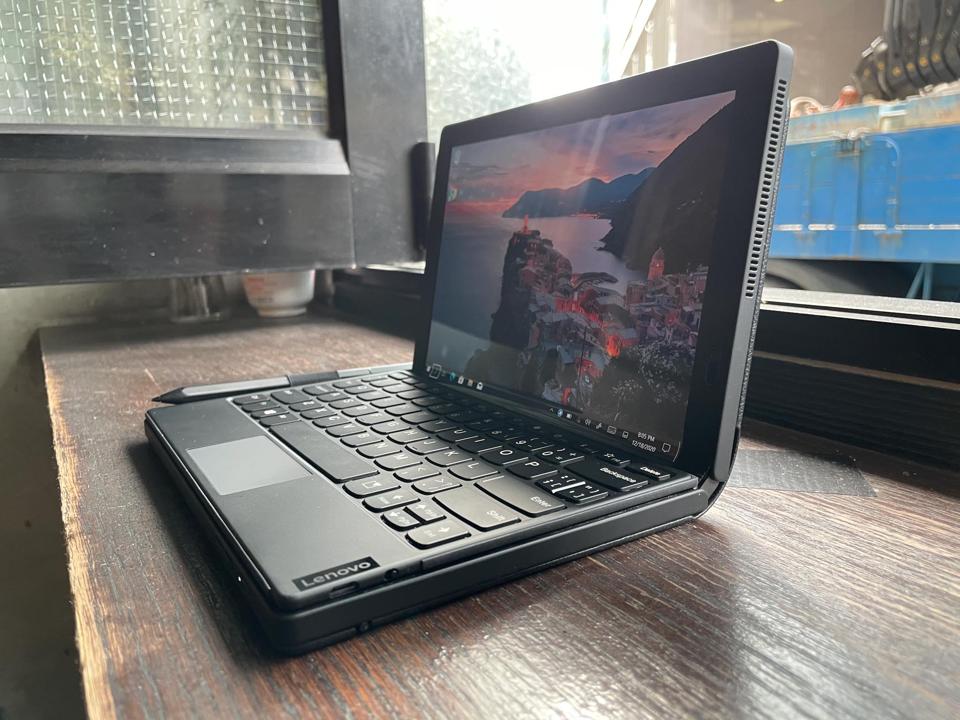
The reason the keyboard is relatively tight is because it’s designed to clip onto half the tablet—covering half the screen. The keyboard clips on magnetically, and once connected, simply bend the screen at roughly a 90-degree angle and you have yourself a clamshell-style laptop—albeit a small one. You now get only half the screen, which measures around 10-inches diagonally, but the aspect ratio shrinks to 16:9.
The keyboard covers the bottom half of the tablet.
Ben sin
The keyboard covers the bottom half of the tablet.
Ben Sin
The screen is a bit cramped in this form factor for extended all-day use in my opinion, but it’s fine for an hour or two in tight spaces—think tight counter tables at coffee shops or airplane seat tray tables.
The stylus works decently. I can sketch and write on it without issues—but it’s nowhere near as responsive as the Apple Pencil. Microsoft’s ecosystem also doesn’t have nearly as many sketching or notetaking apps as iOS.
Jotting notes on the X1 Fold.
Ben Sin
Earlier, I called the keyboard design “clever,” that’s not just because it turns the device into a clamshell laptop. It’s clever because it fits perfectly in the sliver of space left when the device is folded close. This means you can carry the keyboard with the device without additional bulk. This is an issue no other tablet has ever been able to solve.
The keyboard even has a loop to hold the stylus, so everything you need is in one package with no extras to carry.
The Lenovo X1 Fold with the keyboard and stylus.
Ben Sin
And unlike many foldables, the X1 Fold doesn’t feel flimsy: the hinge is sturdy and Lenovo says the device has passed the standard U.S. military rugged testing. What this means exactly is unclear, but despite folding and unfolding the device at least 100 times over the past week, I heard no creaking from the hinge, and the screen feels rigid and firm.
Lenovo ThinkPad X1 Fold in laptop mode.
Ben Sin
Using it in the real world
I am what someone would call a “digital nomad,” I do all my work off a computer and I generally don’t have to follow a 9-to-5 schedule or be tied to one spot, which means my place of work differs from day to day. The versatility of the X1 Fold has been extremely useful. At a cramped coffee shop table with a plate of food, I use it in ultrabook form; when I have more table space, I unfold and take advantage of the large screen. If I need to proofread and edit documents, I can mark changes directly on the PDF with the stylus. Sometimes when I’m on a bus, I hold the X1 Fold like a book—partly folded—and read articles on one half of the screen while surfing Instagram on the other half.
The X1 Fold can run two apps side-by-side
Ben Sin
The Intel Lakefield chip isn’t the most powerful chip around, but it’s enough to handle all office tasks, whether it’s writing documents, editing photos, handling an excel sheet, or conducting video calls.
You can game on the X1 Fold, too, although graphically intensive games will see the framerate drop here and there.
The software here behaves mostly smoothly, transitioning between various shapes and orientations without issues. However, as I said earlier, Microsoft’s Windows 10 is just bad as a tablet: most buttons remain small, as if Microsoft hasn’t realized that human fingers are thicker than mouse arrows. And navigating the UI with swipes and gestures are cumbersome compared to the iPad, or any smartphone.
I’ve tested over a half dozen Windows tablet in the past couple of years, and this has been the case every time—the issue is Microsoft; not Lenovo.
Battery life is okay—the 50Wh battery can run this thing for about six to seven hours depending on use, and charging is done via USB-C (there are only two ports in this machine—both USB-Cs). The lack of a headphone jack is baffling, and the loud speakers are just decent.
But despite these gripes—and that sky-high $3,000-ish price (it varies from region to region)—I still adore the X1 Fold, because its versatility leaves me in awe even a week later.
The Lenovo ThinkPad X1 Fold
Ben Sin
The price makes the X1 Fold a hard sell to most average consumers. But for tech enthusiasts excited to try cutting-edge products, or for those who don’t see $3,000 as a significant amount of money, the X1 Fold holds much appeal.
There have been reliable industry rumors stating that Apple is working on a foldable device, but even before I heard the news I was adamant foldable tech is the future. The benefit of having a large screen in a small form factor is too great.
Just imagine one day in the near future when you can pull a book-sized device from your bag, unfold once or twice, and end up with something like an 18-inch screen. I’m excited already.
The weekend is here and it is our sincere hope that you were able to enjoy a peaceful and joyous holiday as we finally wrap up 2020. For those of you that may now be on the hunt for a new Chromebook, Costco just dropped one of the best deals of 2020 on a device that will make a worthy addition to anyone’s Chrome OS arsenal. The recently released 8GB/128GB version of the Lenovo Chromebook Flex 5 appears to be a Costco exclusive at the moment and with its $499 price tag, it offers the most bang for your buck of just about any Chromebook on the market.
That value just got a whole lot better thanks to Lenovo’s after-holiday sale that can score you this 10th Gen Core i3 convertible for as little as $399. That’s cheaper than the 4GB/64GB model retails for on Amazon and you’re getting the much-needed bump to 8GB of RAM and the addition of 128GB of zippy NVMe storage. The only thing Lenovo left off of this particular configuration is the 300 nit display that they touted back at CES 2020. That would be a very welcome enhancement but the fact remains that you won’t find a flagship Comet Lake Chromebook with this array of hardware for this low of a price anywhere. Here’s a rundown of what Costco’s exclusive Lenovo Flex 5 has to offer.
I say “as low as” because the $399 price tag is exclusive to Costco members but thankfully, you do not have to have a club membership to get in on the savings. For non-members, you will be charged a 5% surcharge but that still nets you this awesome Chromebook for around $460 after tax and a $10 shipping charge. That’s a very stout deal on a Chromebook that offers most of everything Chrome OS has to offer in 2020. You won’t get a fingerprint sensor but that’s about all that this 2-in-1 is missing. For reference, an annual Costco membership is around $60 so it may actually behoove you to join for a year if you think you may use the wholesale club in 2020 and the savings will pretty much pay for the membership. There’s a limit of 2 per customer but that would save you $200 if you need a couple of these Chromebooks.
Another advantage of buying a laptop from Costco is the company’s exclusive “concierge” services that offer free technical support and a two-year warranty on your device. That alone is worth a little extra cash, in my opinion. This sale runs through January 24th but I would bet that Costco will sell out of the Lenovo long before then. This is easily one of the best Chromebook deals of 2020 and what a great way to ring in the new year. Check out the deal below.
After graduating with a B.S. in environmental hydrodynamics from the University of California, I studied reactor physics to become licensed by the U.S. NRC to operate nuclear reactors. There's a striking level of appreciation you gain for everyday consumer electronics after working with modern nuclear reactivity systems astonishingly powered by computers from the 80s. When I'm not managing day-to-day activities and US review articles on Notebookcheck, you can catch me following the eSports scene and the latest gaming news.
With the combination of an Intel Core i9-10980HK and an Nvidia GeForce RTX 2080 Super Max-Q, the Lenovo Legion 7 offers an enormous performance potential. And since this is not a slim subnotebook, the performance is not limited to some short periods of time. This allows the impressive, 15.6-inch, 240-Hz display to really shine. In addition to the high refresh rate, the display also offers a very good contrast and a high maximum brightness. So those who are looking for a still relatively mobile desktop replacement for their gaming PC plus monitor will get their money's worth here.
In contrast to the battery life, the benchmark results and frame rates in games are often top values, since the Core-i9 CPU and GeForce RTX 2080 Super Max-Q are able to make use of their full performance potential, despite the 15.6-inch format. This is probably due to the vapor chamber cooling, which is able to dissipate the heat effectively, even though it can be loud at times.
In everyday operation, the system and WLAN performance are particularly attractive. However, the mediocre keyboard slightly tarnishes the overall impression, which is otherwise quite positive. While the Lenovo Legion 7, which shows a good workmanship overall, still looks relatively subdued when it is turned off, it can start quite a lightshow the moment you turn it on. This can be adjusted (or deactivated) according to your preferences.
However, the largest weakness of the Legion 7 is its timing, since the new generation of mobile graphics card, which will probably bring a large performance jump, might already be introduced in January of next year. So regardless of whether you want to get the performance jump or whether you are hoping for a price drop, it will be worth waiting in either case.
Best Buy's Last Second Savings Event offers solid discounts on laptops, headphones, and video games. So if you're last minute shopping for a holiday deals you still have time to snag some awesome bargains.
As part of the sale, the Lenovo Legion 5 Gaming Laptop is on sale for $799.99. That's $300 off its $1,100 regular price and one of the best gaming laptop deals available right now.
Lenovo Legion 5 deal
Lenovo Legion 5 Gaming Laptop:was $1,100 for $799.99 @ Best Buy Save $300 off on the Lenovo Legion 5 gaming laptop. It packs a 15.6-inch (1920 x 1080) IPS display, 2.6-GHz i7-10750H 6-core CPU, 8GB of RAM, and a 512GB SSD. For graphics handling, it's equipped with an Nvidia GTX 1650 Ti GPU with 4GB of dedicated memory. View Deal
Lenovo's Legion series family of machines are among the best gaming laptops to buy.
The laptop in this deal packs a 15.6-inch (1920 x 1080) IPS display, 2.6-GHz i7-10750H 6-core CPU, 8GB of RAM, and a 512GB SSD.
Although we didn't test this particular laptop, in our Legion 5i review, we praised its clutter-free ports, great sounding speakers, and comfy keyboard.
In terms of design, the Legion 5's minimalist black chassis makes it suitable for work and school. Weighting 5.4 pounds and measuring 14.1 x 10.2 x 0.98 inches, the Lenovo Legion 5 is heavier but nearly the same size as the HP 15 Gaming Laptop (4.9 pounds and 14.25.14 x 10.144 x 0.9 inches). It's slightly heavier but thicker than the Dell G3 15 (2019) (5.3 pounds, 14.4 x 10 x 0.8 inches).
Dell Inspiron 7000 2-in-1:was $900 now $649.99 @ Best Buy Best Buy Last Second Savings takes $250 off the Dell Inspiron 7000. This 2-in-1 laptop packs fast performance into a lightweight, gorgeous design. It features a 13.3-inch (1920 x 1080) touchscreen, 2.4-GHz 11th Gen Intel Core i5-1135G7 quad-core CPU, 8GB of RAM, Iris Xe graphics, and 512GB SSD. View Deal
Beats Solo Pro Wireless Headphones:was $299 now $179 @ Best Buy Now $120 off, Beats Solo Pro wireless headphones have never been cheaper. They feature active noise cancelling, an advanced acoustic system and up to 22 hours of battery life. Snag them now for an all-time low price.View Deal
JLab Audio Go Air Wireless Headphones:was $30 now $19.99 @ Best Buy Now $10 off, the JLab Audio Go Air is at its best price yet. The buds are sweat resistant and offer over 20 hours of battery life which makes them great for workouts.View Deal
Gaming Deals:up to $40 off video games @ Best Buy
Best Buy's Last Second Savings Event lets you save on select video games for all platforms. Choose from fan favorites like Grand Theft Auto V Premium Edition, Mario + Rabbids Kingdom Battle, The Last of Us Part II and more.View Deal
Hey, did you know that Lenovo offered its own line of true wireless earbuds? Neither did I. But here they are and, man, are they cheap. Regularly priced at a modest $60, you can get the Lenovo LivePods LP1 for just $17 at Walmart right now. That's 70% off.
The earbuds look pretty ordinary, modeled after the standard bulb-and-stem design that Apple made famous. They're water resistant with an IPX4 rating and rely on touch gesture control. To be clear, I've never worn or heard these earbuds, and CNET's resident audio guru David Carnoy hasn't tried them either. But Lenovo claims they feature 10mm drivers and have a 20-20,000Hz frequency response. The 40mAh batteries are augmented by a 300mAh battery in the wired (USB-C) charging case.
I'm guessing I have never heard of these because they're probably intended for sale in China. The voice command feature only works in Chinese, and I consider that a huge tip-off. But if you don't mind that, these are an incredibly cheap pair of earbuds from a major brand. Let me know what you think in the comments.
CNET Cheapskate
Get all the latest deals delivered to your inbox. It's FREE!
CNET's deal team scours the web for great deals on tech products and much more. Find more great buys on the CNET Deals page and check out our CNET Coupons page for the latest promo codes from Best Buy, Walmart, Amazon and more. Questions about The Cheapskate blog? Find the answers on our FAQ page.